Showing posts with label How. Show all posts

Saturday, January 19, 2013

How To Make Update Status Via Whatever You Want Via "Mobile/Zero/www.facebook.com"

  6 comments

How to protect USB Flash Disk

  4 comments
8:16:00 PM


Generally, the USB flash drive is relatively small, portable, lightweight, and can be read on all computers and any electronic device that has a USB port. These features make the USB stick into the practical and the perfect medium to transport data to a computer and transfer data to other gadgets and electronic devices. On the other hand, due to the small physical size of the USB stick the USB stick is prone to be lost or changed hands, either because it fell on the road, tucked away, wasted, or taken by someone else without our knowledge. In anticipation of such a condition, then we have to protect the USB stick so that files and data on the flash drive remains safe and easily accessible by others, or abused by others who found our flash. How to protect the flash is the means used to protect the flash / hidden partition on the flash, flash lock, and secure data and files on the flash, so that can not be accessed, opened or used by others. In general, the flash protection can be done in two ways, namely by encryption hardware and software encryption or partition and protect data in a flash.

Read More

Saturday, September 29, 2012

Changing the Windows XP Display Being a Mac OS Lion

  No comments
8:43:00 PM

Apple
Windows XP is the most widely used OS in the world to date, although Microsoft has launched its latest OS from Vista, Seven, up to the latest Windows 8, not many make PC users switch from Windows XP. Many years of using Windows XP will surely arise boredom with the looks that have seen old school. In this tutorial we are going to change Windows XP to Mac Lion with some tools and applications that would require a lot of resources on your PC.

Mac OS X 1

Read More

Sunday, April 29, 2012

How To Create A Button Back To Top Ver. 2 On Blogger

  No comments
7:30:00 PM

Back to top button is a button that serves to return to the top of the page. So that when visitors or blog readers we want to go back up without the scroll itself, they can click and automatically rise to the top.
This widget also does not require reloading at the click so it does not destroy the mood of the reader to click the button. One again, this widget will always be in a position that we have set even if we move the position back to top button widget in Edit Layout.

Simply, this is it How To Make Back To Top Button Ver.2:

Read More

Tuesday, April 24, 2012

How To Make a Button "Back To Top"

  No comments
12:25:00 PM

Back To Top button is the button that serves to show the top of a website or blog after a visitor to read or view the content of postings to the bottom so that when going back to the top, no need to direct the mouse on the scroll bar to see the top of the browser, only simply by clicking the button. Here I will explain how to make it on the blog friends please see below.

Please follow the following steps:

1. Please login account your Blog
2. Select the menu design and the Select Elements Page
3. After that select Add Gadget
4. Then Add HTML / JavaScript
5. And copy and code below:
<a title="Back to Top" href="#" style="position: fixed; bottom: 5px; right: 5px;"><Img src = "http://vgoffice.catholic.org.hk/images/icon/backToTop.gif"> </ a>
Note: replace the blue text with url your picture

Read More

Tuesday, April 10, 2012

How to Show the Hidden Files and Folders in Explorer

  1 comment
12:52:00 PM

Now, I will discuss about how to display hidden files and folders in the explorer. Because there is a request on how to display hidden files and folders in Explorer.

Steps:
1. Open the Explorer
2. Click on "Tools" menu >> "Folder Options".
3. Click the "View" menu, as shown below:

Read More

Saturday, April 7, 2012

How to Create a Menu "DTree"

  No comments
6:43:00 PM


To begin installing this dTree menu, as usual my friend please login to your Blogger account. Then click "Template" > Click on "Edit HTML"

1. Put the code below in the code
<link rel="StyleSheet" href="https://sites.google.com/site/efekefek/file-js/dtree.css" type="text/css" />
<script type="text/javascript" src="https://sites.google.com/site/efekefek/file-js/createdtree.js"></script>
2. Then click Save Template Next thing to do is put my friend dTree HTML code into a sidebar gadget Blog Buddies. The trick, click Layout > Add a Gadget HTML and paste the following HTML code.

Read More

Thursday, April 5, 2012

How To Know Who Copy and paste our Blog posts

  No comments
4:52:00 PM

Did you ever know, that so far there may be someone from another blog that has copy and paste your post ..? But in this case I hope you can be wise wrote.

Even if it does, whether it has permission to copy or paste that without permission, you should be proud, that someone else has used your knowledge to share to everyone. A wise man once said that "it was wonderful to share." So let us share for everyone.

To find out and ascertain whether there are other people who have copy paste your post, please just surfing here

Read More

Wednesday, March 28, 2012

How To Download games on Y8.com

  1 comment
4:09:00 PM

In the post today, I will discuss about how to download games in "y8.com"
steps:
1. Open y8.com
2. Choose game
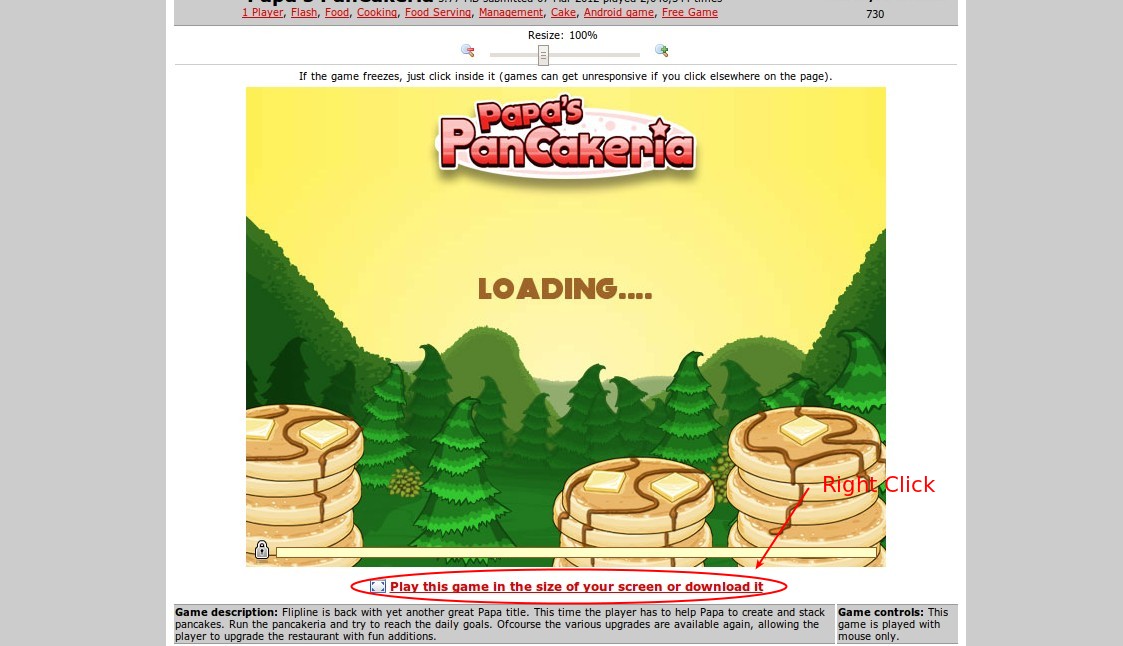
3. after selecting a game, right click on "Play this game in the size of your screen or download it". as below
Click To Zoom
4. Select "Save Link As ..."
5. save it in your folder
6. and Finish

Read More

Tuesday, March 27, 2012

How to See Address Feed Blog

  4 comments
4:32:00 PM

Perhaps among friends there who don't know how to find your blog feed URL or website mate? Yet another friend looking for, for example, for purposes of submitting. How the hell do I know the address of our blog feed?
How to See Blog Feed Address as follows:
1. Open your blog in browser "Google Chrome"
2. Right click on the mouse
3. Then click "Inspect Element"
4. After that, look for the word "feed" in the search element (located at the top right corner). as follows:
Click to Zoom (Ctrl +  Left Click on Mouse)
5. Completed.


Read More

Saturday, March 17, 2012

How to repel mosquitoes with Anti Mosquito softwere

  20 comments
9:02:00 PM


Create your very lazy at the time of another task in front of a computer screen, suddenly interrupted by a few mosquitoes, certainly at the time you feel angry at all because the mosquitoes are biting your body makes your body bump-bump and itching and you definitely do not feel comfortable. Well I have a solution for you to avoid being bitten again by mosquitoes when you do your job the computer screen.

Now is the Age of advanced Softwere only be Able to Repel mosquitoes is not the time to use mosquito coils again.

Here using the name softwere Anti Mosquito with a simple way of working that produce ultrasonic sound with a frequency of 20 000 HZ-62.000HZ


Download:
For Windows Mobile, Click here
For Palm OS,Click here
For Symbian, Click here
For Java, Click here
For Android, Click here
For Iphone, Click here or here or here

Read More

Wednesday, March 14, 2012

How To Scan Virus Website

  1 comment
7:15:00 PM


If you have a website / blog hosting in itself certainly does not hurt to scan your website to ensure kemanannya, who knew there was a virus embedded in it. Or if you are visiting a particular website smelly "underground", warez, torrent, or mature content "XXX", you should make sure the security of the website (often there are reports that such webs often include virus or spyware into your computer).


Usually the signs are infected website:

  • Your website loading time
  • There are popups or alert messages that appear without you knowing
  • When visiting your website, you are suddenly transferred to another website (the term redirects)
  • Antivirus on your computer warn you that the website is less safe
  • Your site listed at URLVoid.com and much more

Right now there is a free facility that can scan for viruses as a website, you can visit to urlvoid.com (this web virus scan and not in the file to your computer)
Easy to use, just enter a web address that you suspect

Read More